
Fiber Laser Marking Machine Maintenance – Quick Checklist
| Maintenance Area | What to Check | Recommended Frequency | Why It Matters |
| Laser Source | Abnormal noise, power fluctuation, overheating | Daily | Prevents premature laser degradation and power loss |
| Optical Lenses | Dust, smoke residue, oil contamination | Weekly (or more in dusty environments) | Dirty optics reduce marking quality and may cause permanent damage |
| Protective Window | Scratches, burn marks, contamination | Weekly | Protects internal optics from debris and heat |
| Cooling System (Air) | Fan operation, airflow blockage | Daily | Overheating is a major cause of reduced laser lifespan |
| Cooling System (Water) | Water level, temperature, leakage | Weekly / Monthly | Ensures stable laser output and thermal control |
| Working Environment | Temperature, humidity, dust, oil mist | Continuous | Poor environment accelerates optical and electrical failures |
| Electrical Connections | Loose cables, grounding condition | Monthly | Prevents unstable operation and unexpected shutdowns |
| Software & Parameters | Backup marking files and settings | Monthly | Avoids data loss and configuration errors |
| Marking Quality | Depth, contrast, consistency | Daily | Early detection of laser or optical issues |
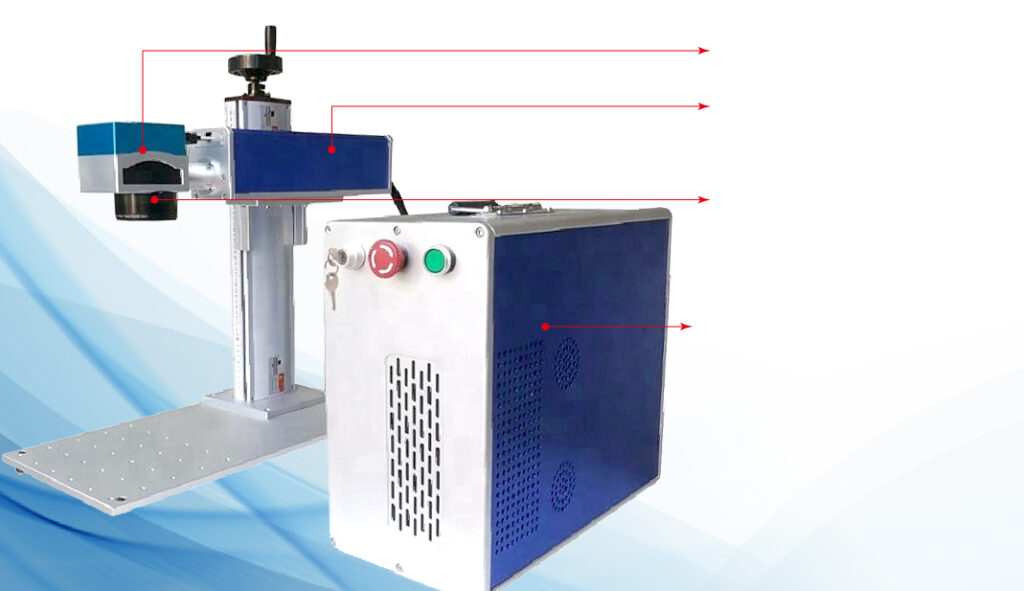
Fiber Laser Source Maintenance
The laser source is the heart of a fiber laser marking machine. While many modern fiber lasers are advertised as maintenance-free, daily attention is still required to ensure long-term performance.
Key Practices:
• Stable Power Supply: Avoid voltage fluctuations. Consider using a voltage stabilizer or UPS for sensitive environments.
• Temperature Control: Maintain operating temperatures between 15–30°C. Avoid excessive heat which accelerates fiber degradation.
• Load Management: Avoid continuous full-power operation. Overloading the laser can significantly shorten its lifespan.
Pro Tip: Many premature laser failures occur not because of low-quality lasers but due to neglect in daily maintenance.
Optical System Cleaning
The optical components, including the F-theta lens, protective lens, and mirror surfaces, directly affect marking quality. Dust, smoke, or oil residues can lead to decreased efficiency or permanent damage.
Cleaning Guidelines:
• Inspect optics weekly for dust or residue.
• Use lint-free wipes and dedicated optical cleaning solutions.
• Do not use alcohol directly on coated lenses as it may damage the surface.
Effects of Dirty Optics:
• Reduced marking quality
• Local overheating of optical components
• Shortened lens lifespan
Cooling System Check
The cooling system is critical for laser stability and longevity. Both air-cooled and water-cooled systems require regular monitoring.
Air-Cooled Systems:
• Ensure air vents and fans are unobstructed.
• Keep the surrounding environment free from heat sources.
Water-Cooled Systems:
• Use deionized water and replace it periodically.
• Inspect water pipes for leaks or aging.
• Ensure proper flow rate and temperature regulation.
Pro Tip: Overheating is one of the leading causes of reduced laser lifespan and frequent power drop issues.
Environmental Control
Maintaining a clean and controlled environment can significantly reduce laser degradation.
| Parameter | Recommended Range |
| Temperature | 10–40°C |
| Humidity | 10-70% |
| Dust | Minimize airborne particles near machine |
| Oil Mist | Keep away from CNC or other oily machinery |
Environmental Tips:
• Avoid high humidity that can condense on optical elements.
• Reduce exposure to metallic dust or fine particles.
• Ensure proper ventilation to maintain a clean workspace.
Electrical and Software Maintenance
Electrical and software issues are often overlooked but can cause recurring problems.
Key Actions:
• Regularly check grounding and connections.
• Avoid frequent power cycling or improper shutdowns.
• Backup marking parameters and project files.
• Only apply official software updates.
Many “unexpected” failures are due to improper electrical connections or parameter corruption rather than hardware defects.
Daily and Weekly Maintenance Checklist
A clear checklist helps operators maintain discipline and ensures nothing is overlooked.
Daily:
• Inspect for abnormal noises or vibrations
• Confirm cooling system is operational
• Check laser status indicators
Weekly:
• Clean optical components
• Remove dust from vents and surfaces
• Check cable connections and grounding
Monthly:
• Verify marking quality consistency
• Inspect water-cooled systems (if applicable)
• Ensure software parameters are backed up
When to Seek Professional Maintenance
Even with proper daily care, certain situations require professional intervention:
• Significant power output decrease
• Marking depth or quality instability
• Frequent system alarms or error codes
• Visible optical damage or abnormal laser beam
Attempting to disassemble the laser without expertise can void warranties and risk injury. Always consult the manufacturer or certified service technicians.
Conclusion
Regular, structured maintenance is crucial for maximizing the lifespan of a fiber laser marking machine. By following the checklist above, operators can reduce unexpected downtime, maintain high marking quality, and ensure a safe working environment. Proper maintenance is not an additional cost—it is a strategic investment in productivity and equipment longevity.